How to Fix Duplicate Assets in Unity Addressables (and Avoid the False-Positive Trap)
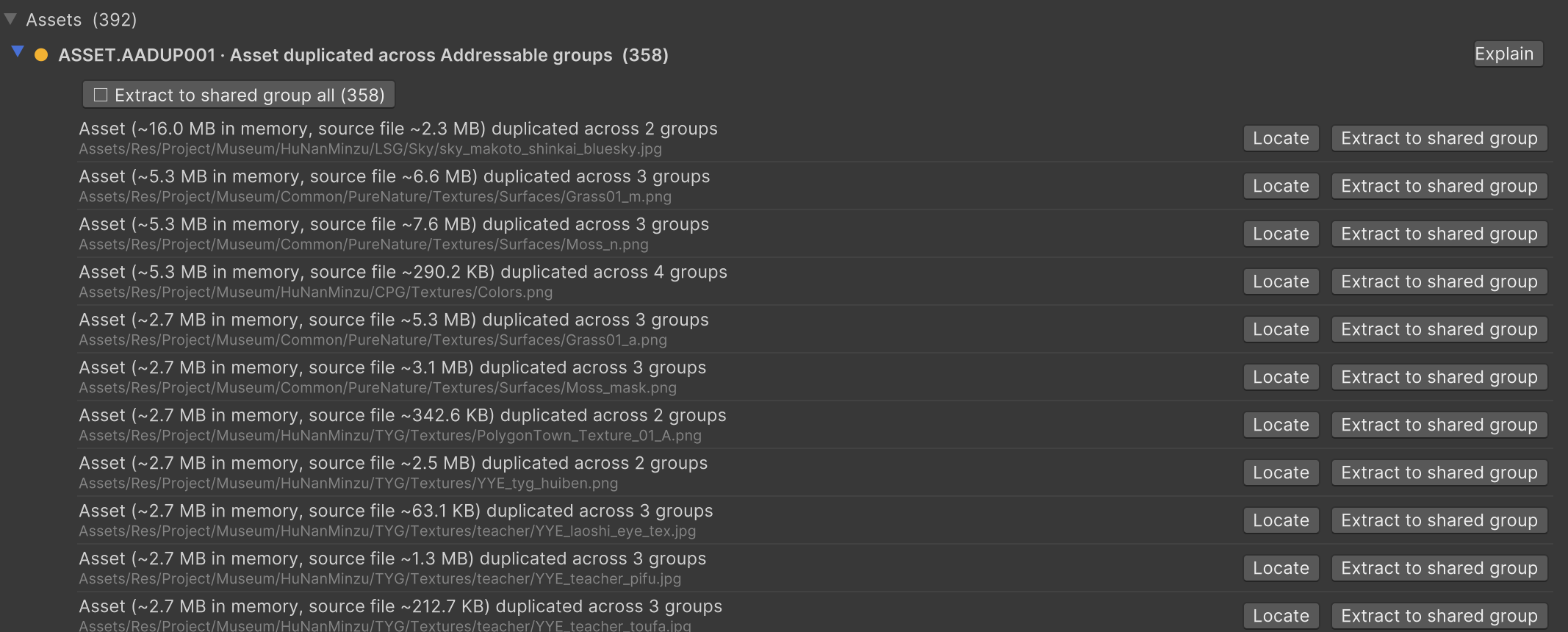
If your Unity build is bigger than it should be — or your memory usage climbs in ways the Profiler can’t quite explain — there’s a good chance the same assets are being packed into more than one AssetBundle. Addressables does this silently, and it’s one of the most common (and most invisible) sources of wasted space in a shipped project.
This guide explains why duplication happens, how to find and fix it with Unity’s built-in Analyze tool, and — most importantly — the false-positive trap that makes the automatic fix do the wrong thing if you’re not careful.
Why Addressables duplicates assets
Duplication comes from implicit dependencies. When you mark an asset as Addressable, you make it explicit. But anything that asset references — materials, textures, meshes, shaders — comes along implicitly, even if you never added it to a group yourself.
The problem starts when two explicit Addressables in different groups share the same implicit dependency. The classic example: two prefabs in two different groups both reference the same material. That material — and everything it depends on — gets pulled into both bundles.
The cost shows up twice:
- On disk: the dependency is stored once per bundle, inflating your total download/build size.
- In memory at runtime: if both bundles are loaded, you get two separate copies of the asset, each with its own instance identity. This is more than a memory leak of bytes — if you mutate one copy’s state at runtime, the other copy never sees the change, because they’re no longer the same object. That’s a genuinely nasty class of bug to track down.
The same mechanism applies to plain AssetBundles too: if two bundles share an implicit dependency that isn’t explicitly assigned to a bundle, Unity duplicates it into both.
How to find duplicates: the Analyze tool
Unity ships a built-in detector. Open:
Window → Asset Management → Addressables → Analyze
Run the rule Check Duplicate Bundle Dependencies. It scans every group with a
BundledAssetGroupSchema, projects the bundle layout, and reports any asset that would end up
in more than one bundle. (The related Bundle Layout Preview rule is useful context — it
shows you the full projected layout.)
Check Duplicate Bundle Dependencies is a fixable rule, meaning Unity can attempt an
automatic resolution (more on that below).
How to fix it
There are three legitimate fixes, in rough order of control:
1. Make the shared asset Addressable yourself
The cleanest fix. Mark the shared dependency (the material, in our example) as Addressable and assign it to a group. Now it lives in exactly one bundle, and every bundle that references it simply loads that bundle as a dependency. One copy, on disk and in memory.
2. Run the automatic fix
If the rule finds issues, you can run its Fix operation. Unity creates a new Addressable group and moves all the shared dependencies into it. Fast, but blunt — read the trap below before you trust it.
3. Group prefabs that share dependencies together
If two prefabs always load together anyway, just put them in the same group. They’ll share the dependency inside one bundle, no extraction needed.
⚠️ The false-positive trap (read this before you click Fix)
The automatic fix is not always right, and two cases trip it up constantly:
Multi-object assets (e.g. an FBX with many meshes)
If a single asset contains multiple objects, different groups can legitimately pull in different parts of it without actually duplicating anything. The textbook case is an FBX with several meshes: mesh A in GroupA, mesh B in GroupB. The Analyze rule sees the shared FBX and reports it as duplicated — but nothing is actually duplicated. If you run the automatic Fix, Unity yanks the whole FBX out into its own group, which can make your layout worse, not better.
SpriteAtlases
Addressables handles SpriteAtlases differently. If an atlas is marked Addressable in its own bundle, the atlas texture lives only there and other bundles reference it — no duplication. But if the atlas is not Addressable (or doesn’t have Include in Build enabled), each sprite that ships can carry its own copy of the pixel data, and the same sprite in multiple bundles duplicates that data. The fix is the same principle as #1: mark the sprites/atlas Addressable and put them in a dedicated group.
The runtime cost of over-extracting
Even when extraction is correct, it isn’t free. Once a dependency lives in its own bundle, that bundle becomes a load-time dependency: it must be loaded whenever you load anything that references it — even if none of its assets are used yet. Loading a bundle has its own runtime cost. For small, always-co-loaded dependencies (like a handful of textures that share the same parents), packing them together is often better than splitting every one into its own bundle (“Pack Separately”). Deduplication is a tradeoff, not a free win.
A separate case: Resources-folder duplication
There’s a related rule, Check Resources to Addressable Duplicate Dependencies, that flags
assets duplicated between your Addressables build and the Resources/ folder — meaning the data
ships in both the player build and the Addressables data. Unlike bundle duplication, this rule
is informational only / unfixable: there’s no safe automatic action. The usual manual fix is
to move the asset out of Resources/ and make it Addressable instead.
Verifying the fix
After fixing, re-run Check Duplicate Bundle Dependencies — it should come back clean for the cases you intended to resolve. Then rebuild and check the Editor Log (Console → top-right dropdown → Open Editor Log) for the per-asset size breakdown, or use the Build Layout Report, to confirm the duplicated bytes are actually gone.
Let PerfLint catch this for you
Hunting duplicates by eye — and knowing which reports are real versus the multi-object
false positives above — is exactly the kind of tedious, high-stakes work that’s easy to get
wrong. PerfLint for Unity scans your project locally (nothing is ever
uploaded) and flags assets duplicated across your Addressable groups as part of its Assets
domain (ASSET.AADUP001), showing each duplicate’s memory cost and where it’s referenced — so
you can jump straight to the real offenders. It’s conservative by design: it won’t push you to
auto-extract something that only looks duplicated. Run a free scan →
FAQ
Where is the Addressables duplicate checker? Window → Asset Management → Addressables → Analyze, then run Check Duplicate Bundle Dependencies.
Why does the Analyze tool report an FBX/mesh as duplicated when it isn’t? Because the rule sees the shared source asset, not which sub-objects each group actually uses. A single FBX with meshes split across groups is reported as “shared” even though no real duplication occurs. Don’t run the automatic Fix on these.
Does fixing duplicates always reduce memory? It reduces duplication, but extracting a dependency into its own bundle adds a load-time bundle dependency. For small, always-co-loaded assets, packing them together can be better than splitting each into its own bundle.
What about plain AssetBundles, not Addressables? Same root cause: implicit dependencies shared across bundles get duplicated. The fix is to explicitly assign shared dependencies to a single bundle.
Rule reference: ASSET.AADUP001